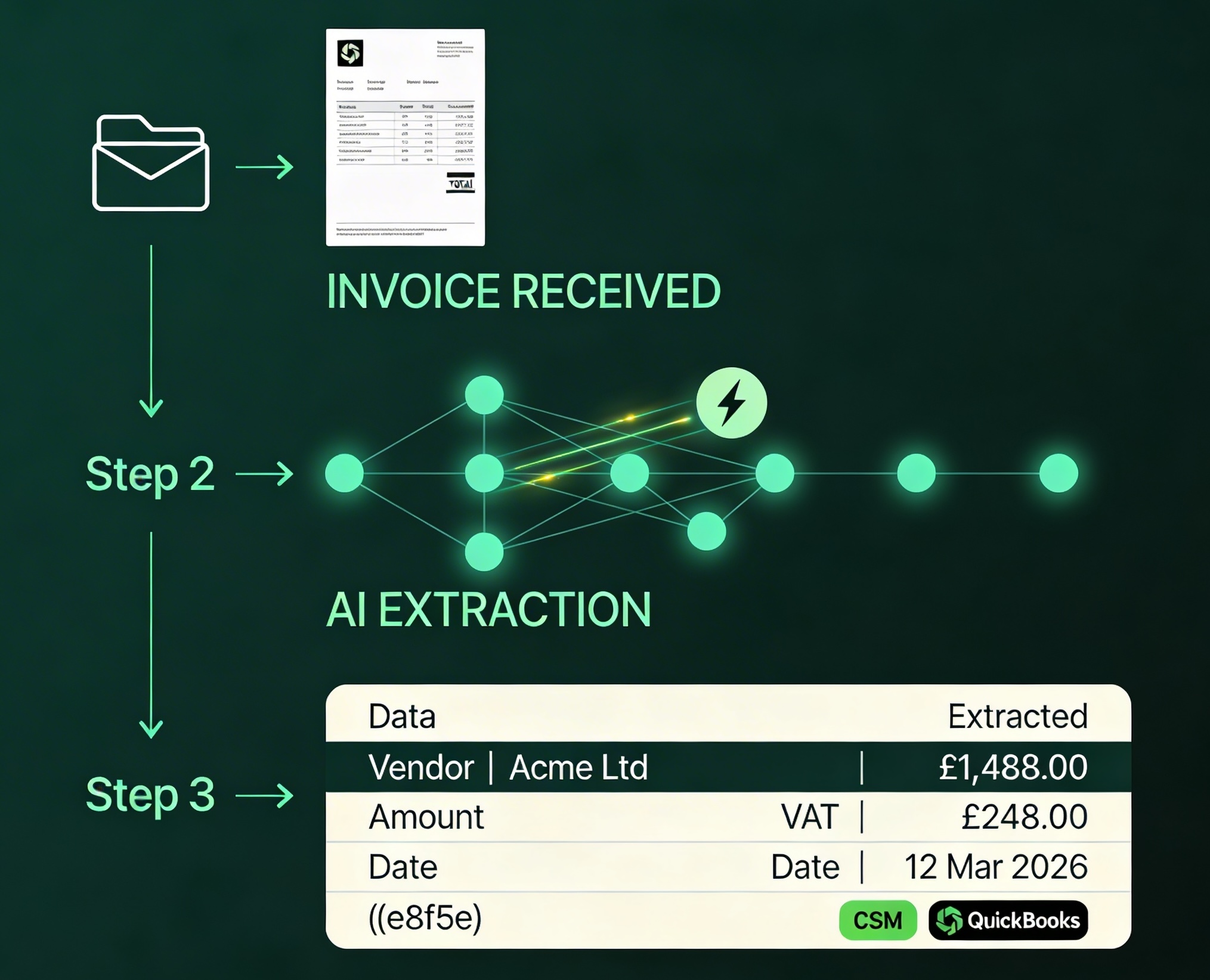
AI Invoice Extraction

Stop keying invoices manually. Let AI do it in seconds.

Email an invoice. It's in your accounting software in seconds. No typing. No setup. Just done.

Work with the tools you already use.

AI invoice extraction — invoice in, clean data out

Your data never
touches our servers.

InvoiceAI processes your image and PDF documents in memory in real time. As soon as the job is completed, all processing artefacts are deleted.

Many platforms store your documents, vendor data, and transaction records in their cloud infrastructure indefinitely.

We have no interest in your data. Our architecture enforces a zero storage policy. No customer or supplier related data records, images, PDFs or emails are stored by us.

No Document Storage

PDFs, images and scans are never written to disk, stored in S3, or saved to any database. Memory only.

No Vendor Data Retained

Supplier names, VAT numbers, contact details. Nothing recorded or retained after data extraction completes.

No Transaction Data Stored

Line items, amounts, PO numbers, product descriptions are never persisted on our infrastructure.

No Email Data Retained

Emailed invoices are never logged, stored, or indexed. No content, no attachments kept. All erased.

Start free. Scale when you're ready.

Every plan includes AI-powered invoice extraction, privacy-first processing, and zero data storage.

All prices include VAT • Billed monthly • Cancel anytime • Scan allowance resets every billing cycle •
Already a customer? Email support@riverlux.org to change your plan.

Compare all features

FeatureFreeStarterBusinessMost PopularProEnterpriseElite
Usage
Scans / month501501,5002,5005,000
Cost per scanFree£0.86£0.37£0.32£0.26
Core Extraction
Invoice to inbox
PDF + image support
JSON export
CSV export
Google Sheets
Email support
Accounting Integration
Xero draft invoices
QuickBooks invoices
Line item GL coding
AP Automation
2-way PO matching
Approval email workflow
Full AP automation
3-way PO/GRN match
Support
Priority support

FAQ

Every question
we get asked. Answered.

How it works, what it connects to, and why your invoices never touch our servers.

What Is It
What is Riverlux Invoice AI?
Riverlux Invoice AI is an intelligent data platform that processes your invoice and receipt documents. You forward an image file of your document via email and we extract every field, and push clean, structured data straight into your Google sheets file and accounting software. No manual keying, no chasing paperwork. We eliminate all manual toil around AP invoice processing by enriching your data. GL mappings are done automatically for every line item in the invoice.
Who is it designed for?
Any business that processes supplier invoices or expense receipts — sole traders with a shoebox of receipts, finance managers handling hundreds of bills a month, and accountancy practices processing thousands of invoice documents across multiple clients. If you are paying people to manually key in invoice and expense data, perform invoice matching against POs or GRs, and verify or key-in GL codes our service might be useful for you.
How is this different from just forwarding invoices to my bookkeeper?
Your book-keeper still has to key the data. Riverlux Invoice AI does the keying — instantly, around the clock, without a typo. Most clients see invoice processing time drop by over 90%. Getting a human to perform data entry, verify and cross check line items and GL codes is time consuming, error prone and expensive. We do all this for you in seconds and for a fraction of the cost.
What problems does it solve?
  • Manual data entry — slow, error-prone, expensive
  • Late payments — invoices sitting in email inboxes unprocessed
  • Compliance risk — missing or miscoded VAT, supplier details, or cost centres
  • Cash-flow blindness — not knowing what you owe until someone chases you
  • Data privacy exposure — your financial data stored on third-party servers indefinitely
How It Works
How do I get invoices into the system?
  • Email — forward or auto-forward invoices to the universal Riverlux inbox address : invoices@processing.riverlux.org
  • Mobile — photograph an invoice receipt on your phone and email it in.
  • What file formats do you accept?
    PDF, JPG, JPEG, PNG, and TIFF. If a supplier emails you an invoice as a PDF attachment — the vast majority of cases — it's handled automatically with no extra steps.
    How fast does processing take?
    Most invoices are fully extracted and pushed to your accounting system within 30–60 seconds of receipt. Email an invoice at 11pm — it's coded, enriched and waiting in Google sheets and Xero by 11.01pm
    What data fields are extracted?
    We extract everything. If its in the document and machine readable we will include it. Common fields you will see are Supplier name, supplier address, invoice number, invoice date, due date, line item descriptions, quantities, unit prices, net amounts, VAT rates and amounts, gross total, currency, and payment reference. We also enrich invoice data, down to the line item level, that gets inserted into Xero with the corresponding GL codes.
    Can I review extractions before they go into my accounting software?
    Yes. Invoice data is inserted into draft/review mode first. You get to post it once you are satisfied everything is in order.
    Integrations
    Which accounting platforms do you integrate with?
    Currently: Xero (live, one-click OAuth), Google Sheets (live), and CSV export (works with any system). QuickBooks, Sage, SAP, and Microsoft Dynamics are on the roadmap. They will be available within the next few months.
    How do I connect Xero?
    Click "Connect Xero" in your dashboard. You're redirected to Xero's secure OAuth login, approve the connection, and you're back. Under 60 seconds. We use Xero's official API — no screen-scraping, no storing your Xero credentials.
    What does it actually post into Xero?
    A draft bill under the correct contact, coded to the appropriate account code, with line items, VAT, and due date populated. It appears in Xero's Bills to Pay workflow exactly as if a human had keyed it — ready for approval and payment.
    I'm not on Xero. Can I still use Invoice AI?
    Absolutely. That is why we include native integration with Google Sheets out of the gate. We also extract your data into CSV so you can import into any system — FreeAgent, Kashflow, Sage, SAP, Dynamics, your own ERP. The easy option is to use our native Google Sheets integration as a live AP tracking dashboard.
    Privacy & Security
    Where is my invoice data stored?
    It isn't. Riverlux Invoice AI operates a zero-storage architecture. Your invoice is processed entirely in memory — document read, data extracted, result delivered — then it's gone. We don't write your financial documents, supplier details, or transaction data to any disk or database. Ever.
    What does "zero-storage" actually mean?
    The processing pipeline runs entirely in volatile memory — RAM — flushed automatically once the job is complete. No Riverlux database contains your invoices. No object storage holds your PDFs. Nothing to breach, nothing to leak.
    How does this compare to other companies in the niche?
    They all store copies of your invoices on their servers — often indefinitely. That means your supplier relationships, payment amounts, and financial data sit in a third-party database. With Riverlux, there's nothing to sit anywhere. The architectural difference is fundamental, not cosmetic.
    Are you GDPR compliant?
    Yes. Under UK GDPR, we operate as a transient data processor — we process personal data on your behalf but retain none of it. No data retention schedule to manage, no subject access request database to query, no breach notification risk because there's nothing stored to breach.
    What happens to invoices sent to the Riverlux email address?
    The email is received, the attachment extracted, and the document processed in memory. Once extraction is complete and the result dispatched, both the email and attachment are purged. No email archive. No document storage. Nothing retained.
    Accuracy
    How accurate is the extraction?
    For standard digital PDFs — the vast majority of supplier invoices — field-level accuracy exceeds 98%. For photographed receipts and scanned documents, typically 94–98% depending on image quality. Particularly reliable on totals and VAT — the fields that matter most for compliance. Every processed document will quantify the level of accuracy. Its recorded in the processing summary footer.
    What happens with handwritten invoices or poor quality scans?
    When confidence falls below our threshold, the extraction is flagged for human review rather than auto-posted. You see a clear confidence indicator for the document so you can review the details.
    Does the AI learn from my corrections?
    Within your account, yes - to a certain degree — supplier-specific rules and account code preferences are learned and applied to future invoices from the same supplier. If you always code invoices from "ABC Logistics" to your Distribution cost centre, the system does that automatically going forward.
    Can it handle invoices in multiple languages?
    Yes. The underlying language model handles all major European languages and most global business languages. French, German, Spanish, Italian, Dutch, Polish, Portuguese — it reads them all. Currency and date format variations handled automatically. Having said that we are optimised for English. It is the primary language.
    Pricing
    Is there a free trial?
    Yes — a 14-day free trial, 50 scans per month. Process real invoices, see the results in your own Google Sheets file, before committing to anything further. No credit card required to start.
    Are there setup fees or long-term contracts?
    No setup fees. No annual lock-in. Cancel anytime via the subscription management portal or just email us at support@riverlux.org. We'd rather earn your business every month than trap you in a contract.
    I'm an accountant with multiple clients. Is there a practice pricing model?
    No. However our higher priced tiers are geared towards high volume users such as accounting practices.
    What if I go over my monthly document limit?
    We'll alert you before you hit your limit and give you the option to upgrade or reduce your processing workloads. We don't cut off processing mid-month without warning.
    Getting Started
    How quickly can I get up and running?
    Sign up, connect Google Sheets and/or Xero (60 seconds via OAuth), forward your first invoice. Start to first result: under five minutes. No implementation project, no IT ticket. No portals. Just email. If it takes longer than ten minutes, something has gone wrong and we want to know about it.
    Do I need any technical knowledge to set this up?
    None. If you can forward an email and click an "Approve" button in Xero, you can use Riverlux Invoice AI. The interface is designed for finance people and business owners, not developers.
    Do I need to tell my suppliers to change anything?
    No. Your suppliers keep sending invoices exactly as they do today. If you want to really speed things up at your end you can setup an auto-forward rule from your accounts payable inbox to the Riverlux inbox (invoices@processing.riverlux.org) That way all your supplier emailed invoices get processed automatically as soon as they arrive in your inbox.
    Ready to stop keying invoices?

    Email an invoice.
    It's in your accounting
    software in seconds.

    • 14-day free trial
    • No credit card required
    • Cancel anytime

    Trusted by bookkeepers & finance teams across the UK

    Accountancy Firms SMB Finance Teams Bookkeepers Freelance Accountants